30 mars 2026

Venice Referral Program
Share your referral link and earn $10 in API credits when someone you refer upgrades to Pro. Referred users also receive $10 in credits. Track referrals from Profile settings or the new referral drawer. The program is open to all users, including anonymous visitors.
Privacy Modes: TEE & E2EE on Venice
Every model on Venice now displays a privacy mode, giving users full visibility into how their data is handled. Models running inside Trusted Execution Environments (TEE) ensure isolated processing, and end-to-end encrypted (E2EE) models go further — not even Venice can see your prompts or responses. Click any privacy badge to see exactly what each mode means.
All models below support both TEE and E2EE. Toggle between modes in model settings.
Venice Uncensored 1.1
GLM 5
Qwen3.5 122B A10B
Gemma 3 27B
GLM 4.7
GLM 4.7 Flash
GPT OSS 20B
GPT OSS 120B
Qwen 2.5 7B
Qwen3 30B A3B
Qwen3 VL 30B A3B
Operated by NEAR AI Cloud and Phala Network.
Import Memory
Import conversation memories from ChatGPT, Claude, and other AI providers into Venice. Rolled out to all users.
https://x.com/AskVenice/status/2033989325830955458
Kling Reference-to-Video
Upload a reference image and generate video that maintains the same character across scenes. Supports character consistency and lipsync in AI-generated videos.
https://www.youtube.com/watch?v=vjA9pECWfTY
New Models
Models added to Venice during this period.
Text Models
MiniMax M2.7 — Text model from MiniMax with multi-turn conversation support.
Aion 2.0 — Text model from AionLabs. Pro only.
Grok 4.20 Beta — xAI's latest Grok text model with function calling and built-in X Search.
Grok 4.20 Multi-Agent Beta — Multi-agent variant of Grok 4.20 with X Search support.
Mistral Small 3.2 24B Instruct — Mistral AI's 24B-parameter instruction-tuned text model. API only.
Qwen 3 Next 80B — 80B parameter dense model from Alibaba Cloud. API only.
Qwen 3 235B A22B Instruct — 235B parameter mixture-of-experts model from Alibaba Cloud. API only.
Qwen 3 235B A22B Thinking — 235B parameter MoE model with extended thinking mode. API only.
Video Models
Kling O3 Pro Reference-to-Video — Character-consistent video generation from a reference image. Pro tier.
Kling O3 Standard Reference-to-Video — Character-consistent video generation. Standard tier.
Seedance 1.5 Pro — Video generation model from ByteDance. Text-to-video and image-to-video. Uncensored.
Audio Models
ElevenLabs Multilingual v2 — Multilingual text-to-speech from ElevenLabs.
ElevenLabs TTS v3 — Latest ElevenLabs text-to-speech model.
ElevenLabs Music — Music generation from ElevenLabs.
ElevenLabs Sound Effects — Sound effects generation from ElevenLabs.
Qwen 3 TTS 0.6B — Compact text-to-speech model from Alibaba Cloud.
Qwen 3 TTS 1.7B — Larger text-to-speech model from Alibaba Cloud.
Model Upgrades
DeepSeek V3.2 — Now supports function calling and structured output. Pro only.
Qwen 3.5 9B — Now supports vision input, accepting both text and image prompts.
App
New Features
Music Generation Duration — Continuous duration control for music generation using ElevenLabs models
Video Queue Progress Bar — Queue items with unknown progress now show an indeterminate loading state
Image Generation Timeout Handling — Timeout errors during image generation now display a user-facing error message instead of failing silently
HEIC Image Upload Support — HEIC images are now automatically converted on upload so iOS photos can be used directly
Drag-and-Drop for Image Edit Prompt — Images can now be dropped directly into the edit image prompt input field
Qwen3 TTS in Playground — Added Qwen3 text-to-speech models to the Playground model selector
Resolution-Based Max Duration — Video models now enforce maximum generation duration based on selected output resolution
Referral Drawer — Dedicated drawer component for viewing and managing referral details
Referrals for Anonymous Users — Anonymous users can now view and interact with referral prompts before signing up
Referral Pro Upgrade Date — Referral dashboard now displays the date each referred user upgraded to Pro
Image Info Button in Edit Tab — Info button on the selected image in the edit tab showing image metadata
Video Duration Ranges on Model Cards — Model cards now show supported video duration ranges
Wallet and Payments
Coinbase Payment Links — Added Coinbase payment links as a payment option
Coinbase API Migration — Migrated Coinbase payments from Commerce API to Payment Links API
Referral Credits in Profile — Referral credits earned now displayed in Profile settings
Out of Credits Flow — User flow for when credit balance reaches zero, prompting next steps
Bonus Credits Callout Card — New card component highlighting available bonus credits
Admin Referral Credits Page — New admin page to view and manage referral credits
Admin Referrals Endpoint — New admin API endpoint for querying user referrals and credits
Referral Credits in Session API — Referral credit data now included in the user session API response
Stripe Invoice Pagination — Added Stripe hasMore parameter to invoice list responses
Auto Top-Up Amount Update — "Amount to Add" field now auto-updates when Auto Top-Up is configured
Next Estimated Payment — Stripe users can now see their next estimated payment amount
Mobile App
Connection Error Message — Added a user-facing error message when the connection is dropped mid-request.
Document Attachment Loader — Fixed missing loading indicator when attaching documents in chat.
Document Pick Wallet Fix — Fixed an issue where selecting multiple files for document upload caused the wallet to log out.
Import Memory Prompt Localization — Added internationalization support for the import memory prompt text.
Android Header Fix — Fixed the right-side header element not rendering in the Android stack header.
Social Feed Video Playback — Fixed playback issues and improved video rendering in the social posts feed.
Social Feed Media Layout — Added inline video playback and a masonry grid layout for media in the Social Feed.
Background Removal — Added a Remove Background action for images in the mobile app.
Video Playback UI — Improved video player interface elements and expanded test coverage.
Video Loading Progress — Video loader now displays percentage complete and estimated remaining time.
Enhanced Prompt Text Selection — Text inside the enhanced prompt popover is now selectable.
Lazy-Loaded Tabs — Image and feed tabs now lazy-load their content instead of rendering on mount.
Filter Defaults and Reset — Adjusted default filter values and added a reset button to restore defaults.
Chat Memory Default — Chat memory is now enabled by default for new sessions.
Video Models in Top-Level Navigation — Video models now appear at the same navigation level as text and image models.
Android Video Tap Fix — Fixed tapping a playing video on Android not registering correctly.
Media Detail Pre-Loading — Images now pre-load before navigating to the media detail screen.
Video State on Tab Swipe — Fixed videos continuing to play when swiping between tabs.
Video Feed Screen — Added a dedicated video feed screen to the mobile app.
Image Feed Screen — Added a dedicated image feed screen to the mobile app.
Video Tab — Added a new Video tab to the main tab layout.
Prompt Screen Keyboard Dismiss — Keyboard now dismisses when leaving the prompt screen.
Video Feed Volume Control — Added a volume control to videos in the feed.
Assistant Video Error Boundaries — Wrapped assistant video components in error boundaries to prevent crashes.
Post Video Error Boundaries — Wrapped video components in social posts with error boundaries.
Prompt Screen Render Optimization — Reduced re-renders on the prompt screen to fix a Hermes runtime crash.
Import Memories Dark Mode — Applied dark mode styling to the Import Memories button; added translations for multiple languages.
Prompt Input Limits — Added character and token limits to the message input components.
Image Modal Orientation Fix — Fixed image modal orientation for large portrait images.
API
Video Transcript API — New public endpoint for video transcription at $0.02 per request.
Music Services v1 API — New /v1/music API endpoints for music generation.
Character Reviews Endpoint — New GET /v1/characters/[slug]/reviews endpoint to retrieve character reviews.
Characters Public API Expansion — Added previously missing fields and features to the characters public API.
GTM on API Settings Page — Added Google Tag Manager loader to the API settings page.
Character Author Field — Characters now use a dedicated author field in their data model.
Chat Response Time — Chat responses now display elapsed response time.
Anonymous API Settings Access — Unauthenticated users can now view the API settings page.
Characters Endpoint: author & isOwner — /characters endpoint now returns author and isOwner fields.
System-Only Message Requests — API now accepts requests containing only system messages.
Default Reasoning Effort — Default reasoning effort for inference set to medium.
Fixes and Improvements
Improved file-type support detection and validation in the chat document upload flow
Updated referral text to clarify that referred users must subscribe to Pro
Improved responsiveness when syncing available models with the server
Updated document upload panel positioning to auto-adapt to available screen space
Fixed a crash caused by the chat message timer exceeding maximum update depth
Fixed clipped content caused by overflow CSS being set to hidden
Fixed a crash when displaying the message header for conversations using retired chat models
Fixed a createTreeWalker crash on the chat page
Added timeout handling for Memoria long-term memory operations
Fixed the Learn More link on the Diem token page pointing to an incorrect destination
Improved how video outputs and scene images are stored and displayed within chat
Simplified the duration label formatting shown during video generation
Fixed badge rendering and layout on mobile web viewports
Updated memory import prompt to request markdown-formatted input
Improved memory import to batch embedding requests and avoid rate limits
Strengthened rate limiting and endpoint validation across REST API routes
Removed maxBatchSize field from API response payloads
Restored Aria voice option in text-to-speech
Fixed referral credits not displaying correctly in the referrals drawer
Fixed referral credits being incorrectly issued for referrals made after subscription
Fixed price helpers and removed deprecated three-day subscription type
Fixed Open Graph thumbnails not displaying correctly for feed posts
Fixed inpaint and upscaler error messages not showing properly for free-tier users
Fixed race condition causing image attachments to disappear from conversations
Fixed defects in the Video Editor
Improved image size error messaging
Added video transcription v1 endpoint with fixed pricing
Improved chat interface to render sub-agent steps and responses
Fixed an error on the chat page that could interrupt conversations
Fixed a loop caused by active model fallback logic in chat
Fixed excessive re-rendering in the chat timer component
Fixed referral stats displaying NaN values
Fixed character selection overlay not dismissing properly on mobile
Fixed prompt history interfering with @mention keyboard navigation
Fixed library page getting stuck in a loading state
Improved authentication loading performance
Fixed theme color selector not indicating the selected color
Fixed promo codes not applying correctly during checkout
Fixed menu items appearing highlighted when not selected
Fixed selected theme not applying on the checkout page
Fixed typos in model descriptions for several models
Fixed incorrect error message when an invalid voice is specified
Fixed message order after editing by correcting the sorting logic
Fixed image modal footer visibility
Collapsed duplicated encrypted reasoning placeholder in TEE/E2EE responses
Fixed image modal orientation for large portrait images on mobile
6 mars 2026

GPT-5.4 Suite Now Available
OpenAI's flagship models GPT-5.4 and GPT-5.4 Pro with extended reasoning are now available to all Venice users. Here's everything else we shipped.
New Models
The following models have been added to Venice:
Text Models
GPT 5.4 — Latest, most advanced text model from OpenAI. Available to all users.
GPT-5.4 Pro — OpenAI's Pro-tier text model with extended reasoning capabilities. Available to all users.
Qwen 3.5 35B A3B — Text model from Alibaba Cloud with 35 billion parameters. Now publicly available to all users.
GLM 4.6 — Text model from Zhipu AI. Now available via API.
GPT-4o — OpenAI's multimodal text model with 128K context window, supporting text, image, and audio inputs. Available to all users.
Image & Video Models
Nano Banana 2 — Google’s image generation model with per-unit pricing. Available to all users on a pay-per-use basis
LTX 2.3 — Video generation model from Lightricks. Available to all users
App
New Features
Video Prompt Auto-Enhance — Video prompts are now automatically enhanced before generation to improve output quality
Keyboard Shortcut: Cmd/Ctrl+Enter — Submit prompts using Cmd+Enter (Mac) or Ctrl+Enter (Windows)
Session Persistence — Chat sessions are now preserved across page reloads and browser restarts
Route-Based Navigation — Navigation now uses URL-based routing, enabling browser back/forward and direct linking
Session Selection — Users can now select and switch between active sessions
Music Generation Queue Polling — Music generation now polls for completion status asynchronously, showing real-time progress updates
Content Violation UI — Improved messaging and presentation when content moderation flags a request
Verification Center Header — New header section added to the Verification Center page
GIF Export — Export generated content as GIF files
Enter Key Submission — Pressing Enter now submits prompts in applicable input fields
Logged-In User Redirect — Authenticated users are now automatically redirected away from landing/login pages
Randomized Video Feed — Videos in the public feed now display in randomized order
Video Gallery — New gallery view for browsing generated videos
Video Completion Notification — Users now receive a notification when their video generation finishes
Recent Chat Images — Recent images from chat history are now accessible in the conversation view
Variant Model Settings — New settings for configuring model parameters when generating variants
Venice Banner — New Venice-branded banner added to the interface
Music Routing and Confirmation — Music generation now includes inline confirmation before submission and updated routing
Wallet and Payments
Billing Interval Toggle — Monthly checkout now includes a toggle to switch between billing intervals.
Video Generation Credit Costs — Credit costs are now displayed in the video generator.
Monthly Crypto Subscriptions — Users can now subscribe to monthly plans using cryptocurrency.
Credit Cost Reminder Modal — A modal now reminds users of credit costs before confirming an action.
Mobile App
AI Agent Skills — Agents now support skills, enabling task-specific capabilities inside conversations.
Multi-Image Support — Send or attach multiple images in a single message.
Voice Input Reliability — Updated speech-to-text handling for the new Expo SDK, including more reliable auto-submit behavior.
Android Message Composer — The message input now grows dynamically on Android to avoid typing and layout issues.
Context Usage UI — Updated the context usage component and fixed layout issues in the context usage popover.
Conversation Rename Dialog — Added a dedicated dialog for renaming conversations.
Errored Message Actions — Assistant messages that fail now surface regenerate and delete actions.
Token Dashboard Navigation — Added authenticated navigation entry points to the token dashboard.
Settings Navigation — Added Settings to the drawer and refreshed parts of the settings UI.
Preferred Model Persistence — The model selector now preserves and displays the user's saved model label.
Credits and Pricing UI — Refreshed credits iconography, price quote styling, and related status colors.
Variant Settings Navigation — Added a back arrow to variant settings bottom sheets.
Animated Image Loader — Image generation now shows an animated loading state, with fixes to loader clipping.
Image Variant Defaults — Updated default handling when selecting image variants.
Media Item Text Layout — Adjusted line height and removed model labels from media item displays.
Chat and Search Layout Polish — Refined chat padding and search group header styling.
API
Music Generation SDK — Added async queue support for music generation in the API SDK
Auto-Mint API Key — API keys are now automatically generated for new accounts
API Key Requirement Removed — API key is no longer required for certain operations
Max Reasoning Effort — New
max_reasoning_effortparameter to control reasoning depth on supported modelsBackground Removal Model — Replaced BEN-2 with Bria RMBG 2.0 for background removal
Checkout Session Endpoint — New endpoint for updating an existing checkout session
Multi-Image Generation — Added support for generating multiple images in a single API request
Free Tier Moderation — Content moderation now applied to free-tier user requests
Credit Grant — 1K credits granted to user accounts
Dynamic Model Selection — Router now dynamically selects the fastest available model for requests
Annual Subscription Pricing — Annual Stripe subscription price changes from $149 to $180, effective March 1, 2026
Router Token Limit — Increased the maximum token limit for model router requests
Grok 4.1 Fast Pricing — Updated per-token pricing for the grok-4.1-fast model
Stablecoin Payments — Added stablecoin as a payment method
Music Task Type — Added
musicas a new task type in the API
Fixes and Improvements
Improved tooltips now appear after a short delay instead of instantly on hover
Updated memory behavior in temporary chat sessions
Improved chat input field now auto-refocuses after sending a message
Improved border animation on the music generation progress indicator
Improved moved video models to a different category in the model selector
Improved video model selector now displays the first 6 models by default
Updated multimodal model status indicator rendering for new content types
Improved removed video models selection box from the default view
Improved upgrade button is no longer shown to users already on a Pro plan
Improved interface now resets to edit mode after completing an action
Improved mode switching is now disabled while a generation task is in progress
Added loading placeholder to reduce layout shift while content loads
Improved document upload and parsing speed in Memoria
Added back arrow to variant settings sheets for easier navigation
Improved adjusted line height and removed model labels from media item text displays
Updated error message for insufficient account balance
Improved access by removing the credit requirement for usage
Improved Phala verification by running it client-side in the browser
Improved model capabilities to support multi-modal inputs
Improved rendering of model thinking output in the chat interface
Improved end-to-end encryption with server key authentication
Improved privacy capabilities with end-to-end encryption support
Improved end-to-end encryption with enhanced security measures
Improved model selector to persist its state across sessions
Improved certificate security by adding CRL revocation checking
25 februari 2026
GPT-5.3 Codex Now Available
OpenAI's code-specialized GPT-5.3 Codex model is now available on Venice, optimized for code generation, refactoring, and debugging tasks. Here's everything else we shipped.
New Models
The following models have been added to Venice:
Text Models
GPT-5.3 Codex — OpenAI's code-specialized text model optimized for code generation, refactoring, and debugging tasks. Available to all users.
Image & Video Models
Seedream V5 Lite — ByteDance image generation model for text-to-image synthesis. Available to all users
App
New Features
Batch Image Deletion — Added the ability to select and delete multiple images at once in
Image-Transition Video on Mobile — Image-transition video models are now available in the mobile app.
Image Storage Policy — Updated image storage and retention policy.
Inline Model Selector — Moved the model selector to an inline position within the generation UI.
Direct Image Generation — Images can now be generated directly from the current context without additional navigation.
Image Info Button — Added an info button on generated images to view metadata and details.
Clear Image History — Added option to clear image generation history.
Image Settings Sync — Image generation settings now sync across sessions and devices.
Prompt Character Limits — Prompt input fields now display and enforce character limits.
Prompt Enhancer Info — Added informational tooltip explaining the prompt enhancer feature.
Rate Limit Display — Added a widget showing current API rate limit usage and remaining quota.
Enhance Prompt Button — Added a button to automatically enhance/rewrite prompts before generation.
Pinned Model Selectors — Model selectors now stay pinned to the top of the panel when scrolling.
Counter Animation — Added smooth animated transitions to numerical counters (e.g., credits, counts).
Unified Combine UI — Unified the combine feature interface across image and video modes.
Wallet and Payments
PPU Credit Alert — New dialog warns users about credit costs before regenerating responses from pay-per-use models
Clickable Credit Elements — Credit indicators in the UI are now clickable
Credit Balance Display — Credit balance is now visible in the UI
Mobile App
Mobile Update Dialog — New dialog prompts users to update the app when a newer version is available
API
Web Scrape & Reasoning — Added web scraping and reasoning capabilities to the API.
Free Tier Limits Removed — Removed rate limits for the free tier.
Single Prompt Support — Added support for single-prompt requests (non-chat completions).
Character-Specific Sampling — LLM sampling parameters now vary per character/persona.
Negative Prompts Disabled — Negative prompt parameter has been disabled.
Qwen Image Model — Added Qwen Image model to the v3 inference router.
Prompt Limit Increase — Maximum prompt length increased to 4,096 tokens.
Murano API Endpoints — Added new API endpoints for the Murano product.
Fixes and Improvements
Updated error message text displayed on mobile devices
Updated image hover action buttons to a circular shape
Fixed header and footer not appearing when scrolling to the top of the page
Improved removed the 4:5 aspect ratio from available options
Improved removed the 4:3 aspect ratio from available options
Improved the metadata panel shown during variant generation
Updated the color of the favorite/star icon
Improved hidden the Variants button when auto mode is active to avoid conflicts
Improved incompatible video models are now automatically deselected when switching settings
Fixed settings modal not adjusting its height to fit content
Improved removed the redundant "New Session" button from the interface
Improved removed wallet connect button from the video landing page
Updated default model parameters for Venice models
Updated default minP sampling parameter for model inference
Improved handling and response behavior when web search fails
Improved wallet-based users are now excluded from promotional credit grants
Fixed image generation prompt not being applied correctly
Fixed image action buttons not responding to clicks
Fixed aspect ratio button not functioning correctly in image generation
Fixed web search and resolution quoting not working correctly
Improved error handling during backup restore operations
Fixed style picker and variant selection issues in image generation
Fixed bugs and improved model selector behavior
Fixed time-to-first-token timer reporting incorrect values
Improved document processing reliability
Improved API to support Anthropic structured output
19 februari 2026
Claude Sonnet 4.6 Now Available on Venice
Anthropic's latest Claude Sonnet model is now live on Venice. This model brings improved capabilities across reasoning, coding, and conversation at competitive pricing — available to all users.
Here's a selection of everything we shipped over the past weeks.
New Models
The following models have been added to Venice app & API:
New Models
Claude Opus 4.6 — Anthropic's Opus-tier model with 1M token context window and strong performance across coding, analysis, and complex reasoning. Now available to all users
Claude Sonnet 4.6 — Anthropic's latest Sonnet with 1M token context, adaptive reasoning, and code performance approaching Opus at Sonnet pricing. Available to all users
GLM 5 — Zhipu AI's latest-generation text model, now available on Venice via DeepInfra. Available to all users
GLM 4.7 Flash Heretic — Uncensored, unfiltered text model from Zhipu AI with 128K context window. Available to all users
MiniMax 2.5 — Text model from MiniMax with multi-turn conversation and strategic reasoning capabilities. Available to all users
Model Updates
GLM 4.7 — Reasoning mode now enabled, supporting chain-of-thought processing. 128K context window
Nano Banana Pro — Now includes built-in prompt enhancement for image generation (Pro users)
App
General Updates
Aspect Ratio Selection — New aspect ratio picker added to image and video generation
Inpainting Settings — New settings panel with controls for inpainting edits
Annual Price Increase Banner — Banner notifying users of upcoming annual pricing changes
Video Studio Link — Added a direct navigation link to Video Studio
Favorite Models — Save models as favorites for quick access in the model picker
Image Paste in Video Studio — Paste images directly into Video Studio from your clipboard
Drag-and-Drop Images — Drag and drop images into Video Studio or chat
Video Variants — Generate variant versions of existing videos
Clear All Button — New "Clear All" button to reset current selections
Multi-Shot Video — Create videos with multiple scenes in a single prompt
Chat Annotations — Inline annotations now appear alongside chat responses
Chat Onboarding — Step-by-step walkthrough for new users on first visit to chat
Video Studio Walkthrough — Guided tour for new users on first visit to Video Studio
Image Input for Prompt Enhancer — Attach reference images when using the video prompt enhancer
Category Suggestions — Added category-based suggestions to model or content discovery
Preferred Model in Settings — Set a default preferred model from the Settings page
Multimodal Image Loader — Upload images alongside text prompts in multimodal chat
Wallet and Payments
3D Secure for Past-Due Payments — Payment retries on past-due invoices now support 3D Secure authentication
3D Secure for Subscription Upgrades — Subscription upgrade payments now support 3D Secure authentication
Mobile Web
Video Studio on Mobile — Video studio link is now visible and accessible on mobile web PWA.
Mobile App
Video-to-Video Generation — New video-to-video mode allows uploading an existing video as input for generation
Favorite Models — Star models to add them to a new Favorites section in the model selector
Favorites Search — Search bar added to the Favorites tab in the model selector
Memoria — On-device memory system that stores context locally on your device between conversations
Auto-Generate Memories Toggle — New setting to enable or disable automatic memory generation from conversations
API
Image Generation Tool — Image generation is now available as a tool in chat completions requests.
Multi-Prompt Video Inference — Video inference requests now support multiple prompts in a single call.
Video Inference End Image — New
end_image_urlparameter for video inference requests to specify a target end frame.Image Model Prompt Enhancer Field — Model listing responses now include
hasBuiltInPromptEnhanceron image models.Image Generation Simple Mode — New
simpleModeparameter added to image generation requests.Prompt Enhancement Rate Limits — New
prompt_enhancerate limit type for prompt enhancement requests.Image Request Field — New
imagefield added to the request schema for image-related endpoints.
Fixes and Improvements
Improved prompt input bar to auto-expand as the user types
Updated model cards in the model picker to support collapsing
Improved removed the enhance prompt toggle from the interface
Added error messages when a response stream fails
Updated pricing for the PixVerse v5.6 video model
Updated Pro badges and icons to be visible to signed-out visitors
Updated Simple mode to hide model name labels
Updated web search results in chat to support collapsing
Improved NSFW video filtering in the social feed
Improved restored the Billing History section in account settings
Improved redesigned the retry payment flow for past-due subscriptions with clearer status and actions
Improved wallet reconnection by skipping the Sign-In With Ethereum step for previously authenticated wallets
Fixed loading dots persisting in auto mode
Added loading indicators to the Clip library while content loads
Improved search to include conversations inside folders in results
Fixed conversation folders section to be scrollable when the list exceeds the visible area
Improved search to hide folder headers and show only matching conversations
Added file size error handling for audio and video uploads that exceed the allowed limit
Fixed video model sub-tabs to be horizontally scrollable in the model selector
Improved expanded image editing API access to free-tier users
Increased rate limits for unauthenticated API users
Updated pricing to tiered model for requests exceeding standard context length
Updated Opus model requests to use tiered pricing
4 februari 2026

2 Million Users: Thank You for Building with Venice
Venice has reached 2 million users — a major milestone for our community. Thank you to everyone who has made this journey possible. Here's everything we shipped this week.
New Models
We have added several powerful new models to the Venice platform:
Text Models:
Kimi K2.5 Model — Offering enhanced performance and capabilities at competitive pricing
GLM 4.7 Flash Model — Access restrictions lifted, making this powerful model available to all API users
Image & Video Models:
xAI Grok Imagine — Enhance your creative capabilities with new models for text-to-image, image editing, and video
Vidu Q3 Video — Publicly accessible video models now available for a wide range of applications and use cases
Chroma — Now available to all Pro and API users for high-quality, uncensored image generation
Character Video Generation
Character Video Generation — Create short videos featuring your AI characters. Uses Qwen Edit for image creation and Grok for video and audio production, bringing your characters to life in engaging video format.
Generate videos with your custom characters
Integrated image and video/audio pipeline
Venice AI Skill on OpenClaw
Venice AI OpenClauw Skill — Venice is now available as a comprehensive skill on OpenClaw, integrating text, models, embeddings, audio, and web search capabilities. Link: https://clawhub.ai/jonisjongithub/venice-ai
Venice is now also discoverable on Clawdhub, making it easier to find and use Venice skills.
Combine Images
Merge multiple images into one composite and edit them together with AI-powered blending.
Multi-Image Selection — Upload and select multiple images to combine into a single composition
AI-Powered Blending — Intelligent blending that seamlessly merges your images
Model Selection — Choose from multiple image models including Nano Banana Pro, GPT Image 1.5, Flux 2 Max, Seedream 4.5, and Qwen-Edit
Available now for Pro users and via API
Venice Video Studio
Venice Video Studio — A dedicated workspace for AI video generation. Create videos from text prompts, images, or existing videos with our standout multi-model generation feature that lets you compare results side-by-side.
Key features:
Generate videos from text prompts, images, or existing videos
Multi-model generation to compare results across different models
Side-by-side comparison view
Available in the App for all users
API Playground
API Playground — Test Venice API endpoints directly in your browser without writing code. After successful alpha testing, the interactive API Playground is now available to all users.
Features:
Test text, image, and video generation endpoints
View real-time responses
Copy code snippets for your integration
App
Agent Activity — Enhanced workflow with tool calling support for improved user experience
Cloud SQL Support — Added support for Cloud SQL Socket URLs for Google Cloud SQL users
Log Enhancements — Improved logging with migration status and modified request and response logs
Container Architecture — Auto-generated container wrapper structs for improved system architecture
Model Indicator — New model indicator SVG added for better model representation
Video Transition — New feature for video transition models with start and end frame specification
Logo Visibility — Enhanced logo visibility with deliberate design choice
Image Display — Improved image display in chat with clearer images
Design Capabilities — Significant enhancement to project's design capabilities with new files and modifications
Visual Indicators — Added visual indicators for easy issue identification
Temporary Video Warning — Modified temporary video warning banner for simple mode
File Upload — Improved file upload with processing indicator and explicit accept attribute
File Picker — Updated file picker to only allow image files for image editing modes
Venice Video Studio — Introduced multi-model video generation comparison tool
Persistent Video Playback — Added persistent video playback in Venice Video Studio
Video Deletion — Introduced ability to delete individual errored videos from queue
Translation Updates — Updated translation files for new hint text
Model Privacy — Integrated existing components to display model's privacy status consistently
Keyboard Handler — Added keyboard handler to video studio prompt textarea
Thumbnail Visibility — Improved thumbnail visibility in video studio
Thumbnail Previews — Introduced thumbnail previews for video queue items
Video Audio — Introduced dynamic video audio behavior with play on click and mute on hover
Character Insights — Introduced character insights feature with automatic extraction and new 'Insights' tab
Widescreen Support — Added support for widescreen 21:9 aspect ratio
Max Prompt Limit — Introduced max prompt limit for improved user experience
Chart Component — Created chart component to visualize daily messages
Video Studio Input — Enhanced overall functionality of Video Studio input panel
Audio Support — Introduced audio support status display for models in Venice Video Studio
Browser Notifications — Introduced browser notifications for video completion
Video Studio Navigation — Modified video studio navigation to always display navigation button
Chat Inference — Improved chat inference with hidden searching and first token
Model Selection — Improved model selection process in video studio
Chat Input Mode — Introduced automatic switching of chat input mode to image mode
Video Card Width — Updated Venice Video studio UI to enforce minimum video card width
Recent Images — Introduced feature to quickly select from recent generated images
Video Generation Time — Introduced feature to log and display video generation time
Model Selector — Improved model selector with click instead of hover
Vidu Logo — Added new Vidu video model logo
Video Generation Retry — Introduced feature to retry character video generation with uncensored model
Video Direction — Introduced comprehensive video direction for character video generation
Image Placeholders — Improved image placeholders to appear immediately and render as they complete
Reasoning Enabled — Introduced 'Reasoning Enabled' toggle in Character Settings modal
Responsive Layout — Improved responsive layout for consistent user experience
Character Mode — Introduced new CharacterModeToggle component
Story Prompts — Introduced feature to provide suggested story prompts for character interactions
Image Context — Improved user experience by providing essential context for generated images
Context-Aware Prompt — Introduced setting to disable Context-Aware Prompt Suggestions
Video Playback — Improved video playback behavior in VideoStudio component
Refresh Button — Introduced refresh button to conversation suggestions feature
Prompt Collections — Made prompt collections in Generated Videos section collapsible
Video Playback Control — Introduced feature to ensure only one video plays at a time
Chat Output — Enhanced chat output rendering with new components and modifications
Confirmation Modal — Introduced consistent themed confirmation modal for video deletion actions
Image Download — Introduced feature to download images after background removal
Button Visibility — Improved visibility of 'Hide Conversation Suggestions' button
Search Button — Moved search button next to notifications button and added back button
Entity Insights — Enhanced entity insights feature with updates to useInsightExtractor.ts hook
Post Detail Modal — Improved PostDetailModal.tsx file to address scrolling issues
Story Suggestions — Changed initial value of storySuggestionsEnabled to false
Action Menu — Updated action menu to remain usable during image and video generation
Translation Updates — Updated various language files and translations.json file
Document Upload Button — Updated icon used in DocumentUploadButton component
Template Columns — Extracted duplicate template columns to a constant and updated panel border styling
Video Fullscreen — Introduced changes to VideoFullscreenProvider.tsx file and updated translation files
Recent Images Helper — Introduced feature to display video studio input images in recent images helper
Edit Image Modal — Introduced ability to paste images directly into Edit Image modal
Video Gallery — Updated video gallery to maintain 2-column layout until xl breakpoint
User Experience — Improved user experience with various updates and enhancements
Responsive Video Gallery — Introduced responsive video gallery grid that adapts to different screen widths
Wallet and Payments:
Clear Guidance — Understand why the submit button is disabled when watching videos or using credit-billed models without logging in
Easy Credit Management — Get clear explanations and direct access to purchase more credits when running low in the Video Studio
Improved Payment Options — Enhanced payment method displays and updated translations for a smoother user experience
Expanded Access — Free users can now access auto top-up and billing sections for more convenient account management
Performance:
Persistent Video Generations — Completed video creations are now saved across page refreshes for a seamless editing experience
Mobile App
Image Sharing — Easily share images directly to the app and attach them to chats
Responsive Design — Improved layout and responsiveness for a better user experience
Model Updates — Enhanced model definitions for more accurate and efficient processing
Technical Updates — Behind-the-scenes improvements for smoother app performance
App Version Display — Quickly view your app version in the account info section
Clear Pricing — Subscription prices now clearly displayed in US dollars
Screen Lock Prevention — Phone screen stays on during tasks like voice recording and AI processing
Advanced Query — Expanded query functionality for more powerful searching
Folder Management — Easily create, delete, and manage mobile folders and conversations
Toast Message Improvement — Update toast messages now fit neatly on mobile screens with reduced font size and text
API
API Playground — Rolling out to all users after successful alpha testing
Multi-File Update — Improves overall system performance and functionality by updating multiple files and adding new ones.
Single File Modification — Enhances user experience by modifying a single file to improve its functionality.
Chat System Expansion — Expands the features or improves the existing chat system for better user interaction.
Error Message Improvement — Provides helpful error messages when a CONTENTPOLICYVIOLATION error is encountered, improving user experience.
Model Access — Allows users to access the model regardless of their subscription tier, with costs being incurred on a pay-per-use basis.
Debugging Enhancement — Introduces a new error code to differentiate between model runner rejections and validation failures, enhancing debugging and observability.
Model Metadata Update — Updates the model metadata to provide a direct link to the model's Hugging Face repository.
Video Inference Capability — Enables video models to utilize start and end frame capabilities.
Video Model Enhancement — Introduces a new capability to the VideoModelSchema, specifically the supportsEndImage feature.
Insight Extraction API — Enables the extraction and return of structured profile updates from conversations.
ImagineArt 1.5 Pro — Enables public access to ImagineArt 1.5 Pro.
Technical Update — Updates the interface and prioritizes Qwen3 VL 235B for vision requests.
API Price Sheet Update — Adds ImagineArt15Pro to the API price sheet and updates its FAL analytics URL.
Model Availability — Demonstrates the ease of managing model availability through configuration updates.
Request Tracking — Improves the tracking and identification of requests.
Social Feed Update — Allows users to post images without providing any text fields.
Security Enhancement — Enhances security by adding a minion authentication header to the TTS request.
Character Image Generation — Updates the character image generation prompt logic to use the flag.
Technical Enhancement — Supports enhancements by modifying or adding files.
Tool Support — Introduces support for xAI server-side tools, specifically websearch and xsearch.
Whisper Large V3 — Makes Whisper Large V3 public.
Video Studio Access — Expands access to the video studio, potentially enhancing user experience.
Variable Addition — Adds a variable to the script and uses it in the function.
Grok Imagine Update — Updates the Grok Imagine Text-to-Video and Video-to-Video models to reflect their audio support.
Model Access — Enables public access to the models by setting the configuration.
Migration Files — Adds new migration files to ensure a smooth transition to the updated schema.
Code Update — Updates the existing functionality by adding and removing lines of code.
Cortex Data — Expands the functionality of the API, allowing for more interactions with Cortex data.
SSE Streaming — Introduces support for nested containers with arbitrarily deep nesting in SSE streaming.
Model Discovery — Allows API clients to discover and select the model, which was previously hidden.
Function Update — Updates the function with an added test case to verify the behavior.
Refresh Index — Introduces a new index to support refresh operations.
Function Update — Updates the function with additions to the files.
Technical Update — Includes renaming of queries, optimization of images, and updates to manual header settings.
Schema Update — Updates the schema.prisma file with notable changes.
Cortex Data Endpoint — Introduces a new endpoint for listing cortex data, enhancing the API's functionality.
Cortex Entities — Introduces new API endpoints for managing cortex entities, including retrieval, creation, and publication.
Image Model Specs — Enhances the image model specs with aspect ratios, providing more detailed information about the images.
Grok Imagine Defaults — Updates the default resolution to 720p and duration to 10s for Grok Imagine video models.
Documentation Update — Updates the documentation with comprehensive information.
Inpaint Model Settings — Introduces aspect ratio settings to the InpaintModelSchema, allowing for more flexible image editing.
Posts Filtering — Introduces an optional parameter to the posts list endpoint, allowing for server-side filtering of posts by media type.
Media Type Filtering — Introduces an optional parameter to the posts API client, allowing for server-side media type filtering.
Model Sets — Introduces the concept of model sets for video models, allowing for better categorization and filtering.
Video Model Enhancement — Passes the selected video model ID to the prompt enhance endpoint in Video Studio.
Prompt Enhancement — Enhances prompts for video models by using a video-specific template, including details like motion, camera movements, and audio atmosphere.
Video Model Schema — Introduces an optional modelSets array field to the VideoModelSchema, allowing video models to be categorized into sets.
Traffic Routing — Introduces percentage-based traffic routing to LLM host configurations, enabling weighted distribution.
Payment Retry — Introduces an optional parameter to the past-due invoice payment API, allowing for retrying payments with the customer's current default payment method.
API Usage CSV — Disables API usage CSV download.
Subscription Upgrade — Introduces the ability to immediately upgrade Stripe subscriptions.
Prisma Client Update — Introduces a 30-second statement timeout for PrismaClient.
Conversations Selector — Introduces a new conversations selector for folder IDs, enhancing the functionality of the useConversations hook.
API Settings — Introduces an component to the API settings page, enhancing discoverability and user experience.
RxDB Schemas — Introduces new RxDB schemas for storing audio and video attachment metadata locally.
Cache Backfilling — Enables the backfilling of missing cache rows for users from USD ledger entries, improving data consistency.
Sharp Image Processing — Calls Sharp image processing paths to reduce high event loop pauses, particularly for large images over 1MB.
User Management — Improves the overall functionality of the user management system.
List Update — Updates the list to include 'Immediate' and adds filters to exclude false positives.
Entity Insights — Introduces new fields for demographic and physical appearance to entity insights, enhancing the schema.
Demographic Fields — Adds demographic fields to entity insights, enhancing the functionality of the app's insight extraction capabilities.
Deprecation Information — Introduces a new flag, apiShowDeprecation, to control the display of deprecation information in API responses.
Code Cleanup — Cleans up import paths in enhance-image.ts and multi-edit.ts.
Multi-Image Editing — Introduces a new multi-image editing endpoint, allowing users to submit up to 3 images for editing.
Routing Enhancement — Allows for more flexible and resilient routing.
Prisma Configuration — Updates the Prisma configuration to accommodate cleartext connections.
Billing Endpoint — Introduces a new GET /api/v1/billing/balance endpoint that returns the current balance, daily usage, and epoch reset time, requiring an Admin API key for access.
Fixes and Improvements
Image & Video:
Fixed issues with image handling in video generation to support start and end images
Fixed pricing calculations for image-to-video models by adding a fixed input cost field
Fixed visual effects issues with image-to-video generation, including problems with grey backgrounds
Fixed image copy protection by adding a custom 'Copy' action that intercepts the context menu
Fixed video gallery layout to display videos in a consistent 2-column grid
Improved video studio model matching for better accuracy
Improved video display quality and playback behavior
Enhanced video generation guidance with video-specific prompts
Improved PWA video generation reliability
Adjusted video player layout for better viewing experience
Chat & UI:
Fixed post modal scrolling issues
Improved conversation suggestions visibility
Improved action menu behavior during inference
Updated ChatOutputItem renderer for better display
Improved icon consistency across the app
Wallet & Payments:
Fixed release and pricing issues
Improved insufficient credits error handling with clearer messages
Improved payment method UX with better displays
Added auto top-up indicator for better visibility
Mobile:
Improved API page mobile responsiveness
Improved image handling on mobile
Improved mobile update toast to fit better on smaller screens
Prevented screen lock during idle tasks like voice recording
Data & Backend:
Improved VIS error tracking for better debugging
Enhanced event loop monitoring to identify performance issues
Added memory leak prevention rules to streaming handlers
Added GC pause monitoring for performance optimization
Improved Redis metrics and lock tracking
Added 30 second statement timeout for database queries
User Experience:
Updated video playback behavior for smoother experience
Made prompt collections collapsible for cleaner interface
Improved grid layout responsiveness across screen sizes
Added visual feedback to action buttons
Prevented blob URL copying for better security
28 januari 2026

Memoria: Your Private AI Memory
Venice introduces Memoria — a revolutionary local-first memory system that gives Venice the ability to remember context across your conversations while keeping your data completely private.
Unlike cloud-based memory systems, Memoria stores everything directly in your browser using an advanced in-browser vector database powered by FAISS (Fast Library for Approximate Nearest Neighbors). This means:
Complete Privacy: Your memories never leave your device — no server storage, ever
Intelligent Recall: Venice can reference past conversations, your preferences, documents you have shared, and important context
Seamless Experience: Memory works automatically in the background as you chat
Full Control: Manage your memory documents in the new Chat Memory tab, toggle extraction on/off, and delete anything at any time
Multi-File Upload: Upload multiple documents to Memory at once
Memoria is now enabled by default for all Pro users. Access your memory settings by clicking the memory icon in chat or visiting the Chat Memory tab in settings.
New Models
We have added several powerful new models to the Venice platform:
Text Models
Kimi K2.5 — Powerful reasoning model from Moonshot AI with excellent multi-turn conversation capabilities, now available to all users
Claude Sonnet 4.5 — Anthropic's newest balanced model, available to all users
Qwen 3 VL 235B — Advanced vision-language model with 235 billion parameters (Pro users)
Gemini 3 Flash Preview — Google's latest fast inference model, available to all users
GPT-5.2 Codex — OpenAI's latest coding-focused model (API-only)
Video Models
LTX V2 — New video generation models with improved quality (all 4 variants available)
Wan 2.6 Flash — Fast image-to-video generation
Image Models
ImagineArt 1.5 Pro — High-quality image generation with excellent prompt adherence
Flux 2 Max — Black Forest Labs' flagship model with exceptional photorealism and detail
GPT Image 1.5 — OpenAI's advanced image generation with improved text rendering
Model Upgrades
Veo 3.1 — Now supports 4K resolution output
Qwen-Edit — Now the default image editing model with improved multi-edit support
Nano Banana Pro — Now supports 1K, 2K, and 4K resolutions
App
New Features:
Background Removal — Remove backgrounds from any image with one click (Pro users)
New Edit Image Models – Now supporting Nano Banana Pro, GPT Image 1.5, Flux 2 Max, Seedream 4.5, and Qwen-Edit
Combine Images — Merge multiple images together with AI-powered blending, with model selection dropdown
Transparency Indicator — Checkered background shows transparent areas in images
Character Selfie Mode — Generate images of your custom characters (Pro users)
Vision Routing — Vision requests now route to Qwen3 VL 235B in the background
Character Visualization Button — Quick access to visualize characters
Import Character Conversations — Bring your character chat history into Venice
Audio Input for Video — Add audio tracks when generating videos (for supported models)
Venice Voice Pause — Pause and resume text-to-speech playback
Web Scrape Toggle — Control URL scraping behavior in Auto mode with smarter URL accessibility checking
Video Completion Notifications — Browser notifications when your video generation finishes
Drag-and-Drop Visual Feedback — Clear overlay when dragging files into chat
Download As Menu — Choose your preferred format when downloading images
Announcement Toasts — New toast notifications for feature updates
Past-Due Subscription Visibility — Users can now see and manage past-due subscription status
Tooltip for Disabled Input — Clear messaging when chat input is disabled and why
Video Duration Detection — System detects and displays video duration before processing
Highlight to Chat — Select assistant message content and add it directly to chat input
Search Provider Switching — Switch between Brave and Google for web search
Video Start/End Frame — New UI for video transition models
Auto Prompt Enhancer — Now available in regular image mode, not just simple mode
Edit Variations — Select 1-4 variations in the edit (inpaint) modal
Model Variant Tooltip — Tooltip shows which model is selected in variant selector
Streaming Indicator — Visual … indicator when waiting for LLM chunks
Social Feed Improvements — Beautiful new grid layout for browsing community creations
Video Autoplay — Videos now autoplay as you scroll through the Social Feed
Video Thumbnails — Preview videos directly in the Social Feed before clicking
2-Column Mobile Grid — Better layout for browsing the feed on mobile devices
Wallet and Payments:
Instant Crypto Payments — Crypto payments now credit instantly to your account
Wallet Connect Upgrade — Upgraded to latest WalletConnect packages for more seamless sign-in
Crypto to Credit Card Switch — Crypto subscribers can now switch to credit card billing
Auto Top-up — Automatically add credits when your balance is low (Pro users)
Stripe Graceful Degradation — UI gracefully handles when browser blocks Stripe
Performance:
Sidebar virtualization for faster performance with many conversations
Improved streaming with pause button and visual feedback
Context filtering optimization for better KV cache hit rates
Removed artificial 2.2 second loading wait time
Improved API page mobile responsiveness
Cached input tokens now used in web app inference
Next.js 16 upgrade — builds reduced from 4.5 to 2.5 minutes
Mobile App
Venice Voice — New text-to-speech functionality that adapts to your language
Native Markdown Renderer — Better text formatting throughout the app
Conversations Grouped by Date — Chat history organized chronologically for easier browsing
Image-to-Video — Turn any image into a video directly from mobile with improved flow
New Settings Screen — Redesigned settings with better organization
Image Picker for Combine — Add images to combine directly from your library
Token Usage Tracking — See your token usage during conversations
Rate Limit Notice — Clear messaging when you hit rate limits
iOS Share Extension — Share images directly to Venice.ai from your iOS photo library
Improved Model Selection UI — New model badges and improved selection interface
Empty State Improvements — Better handling with keyboard dismissal
Android APK 1.8.0 — New version available for direct install
API
New API Dashboard — Track your usage by model and API key with detailed breakdowns
Nano Banana Pro Resolutions — Now supports 2K and 4K resolutions via API
SST Endpoint — Speech-to-text endpoint now available for API users
New Model API Fields — Added privacy, description, betaModel, and deprecation.date to models endpoint
API Key Prefixes — Keys now prefixed with VENICE-ADMIN-KEY- or VENICE-INFERENCE-KEY- to distinguish types
API Key Editing — Support for editing existing API keys
Cache Token Pricing — Optimized pricing for GLM 4.7 and models with input caching
Claude Cache Write Tokens — Charged at 1.25x input rate
Search/Scrape Pricing — Flattened to $10/k for all models
Video Rate Limits — Updated to 40 RPM for API with tier-based limits for UI
Developer Role Support — Added "developer" role in chat completions schema for GPT-5.2 Codex compatibility
Video Start/End Frame — Support for video transition models via API
Insight Extraction API — New endpoint for extracting insights
Model Suggestions on Error — When a model is not found, similar available models are suggested
Fixes
Wallet & Payments:
Fixed wallet QR code scanning issues for Base Wallet and Coinbase Wallet
Fixed WalletConnect signing errors
Fixed missing fonts in WalletConnect modal
Improved wallet disconnect consistency
Fixed duplicate auto top-up charges
Fixed Pro user chat rate limit bypass
Browser Compatibility:
Fixed Safari CodeMirror compatibility issues
Fixed ad-blocker handling for Stripe payments
Fixed Chrome Chromebook typing issues
Image & Video:
Fixed image variant preservation during editing
Fixed image EXIF preservation when downloading
Fixed character chat model selection errors
Fixed video upload error handling
Fixed photo viewer layering issues
Fixed duplicate share button appearing
Fixed multi-image switching bug
Fixed inpaint variations button visibility
Fixed video credits not showing
Fixed invalid stored video settings reset
Fixed image dimension validation in InpaintingModal
Chat & UI:
Fixed mobile tooltip display issues
Fixed LaTeX rendering (math expressions like 2^2=4 with citations, double ^^ issues)
Fixed streaming empty response when reasoning disabled
Fixed chat messages with line breaks displaying as single line
Fixed prompt input not clearing after submission
Fixed "The selected model is temporarily offline" error display
Fixed hidden close button in video summary
Fixed divider reasoning spacing
Fixed text color (text.muted to text.subtle)
Fixed hover tabs causing premature close in model selector
Fixed action panel delay and click behavior
Fixed share conversation for character chats
Fixed privacy warning flashing and checkbox color
Fixed chat input when video generation active
Fixed new chat button not working
Fixed chat history shared among different chats
Fixed enhance message undefined check
Data & Backend:
Fixed database connection errors
Fixed network timeout handling
Fixed tag injection for Deepseek 3.2 and Kimi K2
Fixed billing history transaction time (+5 min offset)
Fixed Claude assistant message error with tool_calls
Fixed video quote requirements/schema
Fixed prompt enhance V3 rewriting issues
Fixed model router back to Venice Uncensored for proper routing
Replaced keyv-upstash with @keyv/redis for cache-utils
User Experience:
Fixed download as image format
Fixed overflow/viewport height issues (using dvh)
Fixed default settings route
Fixed public character cache on moderation
Fixed burn chart data
Updated burn history with etherscan and historical fiat prices
Padded burn history to show minimum 12 months
Removed exclamation marks on welcome modal
Updated model selector hover state handling
Added search icon while searching
Added missing featured flag for public characters
Added temporary badge to temporary character chats
Improved batch deletion UX
24 december 2025

Venice Now Hosts All Leading Frontier Models
We've significantly expanded our model library to include the latest and most powerful frontier AI models available. For text, we've added Grok 4.1 Fast with reasoning and vision, Claude Opus 4.5, Gemini 3 Pro Preview, Kimi K2, GPT-5.2, and Deepseek 3.2. For video, we've launched LTX 2 Video, Kling 2.6, and the new Longcat video models. For image generation, GPT-Image-1.5 is now available for alpha users.
These models use credits, and requests through these models are anonymized. Venice is now your one-stop-shop for accessing cutting-edge AI.
App
Fixed a bug where upscaling or enhancing an image at 1x would switch the conversation type to "image". The conversation type now remains consistent.
The "Use original prompt" option for upscaling is now correctly capped at the maximum prompt length for the enhance feature.
Added the ability to mute users directly in the Social Feed.
The "Auto" model is now hidden from the model switcher when you are in the video category.
Fixed an issue where credit estimates were not displaying correctly on small screens.
Added resolution selection to the NanoBananaPro model.
Added an overflow scroll to the memory documents section to prevent UI issues.
Moderated posts now appear at the top of the Social Feed for visibility.
Added a tooltip to the locked label on the token dashboard for better clarity.
Fixed an overflow issue on the preferences modal for guest users on the profile page.
Added feedback buttons to the Support Bot responses.
Hid the mature filter in preferences for non-Pro users.
Improved system-prompt token calculation for more accurate usage reporting.
Fixed a bug in multimodal regen.
Swapped user-facing "Beta" tags to "Alpha" or "Alpha Tester" for consistency.
Added estimated pricing display for Pay Per Use LLM models in the model selector.
Added drag-and-drop image upload functionality to the edit, combine, and upscale modals.
Replaced all instances of "points" with "Venice Credits" in the user profile and settings.
Relaxed schema validation for chat completions to allow unknown fields, improving compatibility with third-party clients.
Updated the chat input loading spinner and image loading animation for a smoother experience.
Added a way to feature characters and updated the default sort on the public characters page to "Featured".
Fixed duplicate entries on the "Browse Characters" page.
Fixed the NSFW overlay regeneration logic.
Updated search provider labels for clarity.
Added resolution and websearch information to the image details view.
Fixed style preset settings for models that do not support them.
Added a message to the Support bot for non-Venice related questions.
Added a copy button for markdown tables.
Fixed buttons in the row component from shrinking incorrectly.
Mobile App
Added 3 new languages (using Google Translate for now).
Mobile credit purchases now redirect back to the native app after completion.
Fixed tooltips getting stuck on Android devices.
Models
Promoted nano banana pro to the beta API.
Increased the price of Nano Banana Pro.
Launched the new LTX 2 Video model.
Added the new Grok 4.1 Fast model to all users and the API, with reasoning and vision enabled.
Added new Pay Per Use models: Gemini 3 Pro Preview and Kimi K2.
Upgraded Seedream to version 4.5.
Launched Kling 2.6 publicly.
Launched Deepseek 3.2 as a live PRO model, with API support and reasoning enabled.
Added new Longcat video models.
Added the new Claude Opus 4.5 model.
Made GPT-Image-1.5 live for alpha users.
Removed DeepSeek R1 (beta) from the API.
Began the two-step process of retiring the Venice-hosted Qwen235B model.
Added the new GPT-5.2 model.
Removed Devstral 2 from the API and Kandinsky 5 from the app.
Enabled reasoning for Deepseek 3.2 again after provider fixes.
API
Added Fal image generations to the API.
Updated API documentation for FAL model configurations.
Added support for the
reasoning_effortparameter.Added support for the
cache_controlparameter.Added support for
prompt_cache_keyin the LLM schema to improve cache hits.Preserved
reasoning_detailsblocks for advanced tool calling and reasoning.Fixed API Dashboard usage display to handle negative values correctly.
Added support for analysing audio and video files for Gemini 3 Pro/Flash and other compatible models.
Fixed API KEY consumption, which was incorrectly limiting some users to 50% of their available Diem balance.
Added consumable balance to video API request headers.
Added support for Anthropic-format tool configurations and the
tool_use/tool_resultmessage format.Added cache token tracking and discounted billing for models that support context caching, including Anthropic models.
Token
Fixed the
diem_global_utilizationview to include refund entries.Busted the Diem usage chart cache to reflect corrected data.
Added a new "burn" section to the token page.
Fixes and Improvements
Fixed a bug where prompts longer than the enhance model's limit would cause errors.
Fixed credit estimates display on small screens.
Fixed incorrect display of the "Reasoning" tag in text details.
Fixed an image aspect ratio issue in multimodal chats.
Fixed resolution examples to use "1K", "2K", and "4K" labels.
Fixed social user name validation to allow hyphens.
Fixed FAL image model pricing.
Fixed regen for character images.
Fixed aspect ratio issues in selfie mode and the image loader.
Fixed a bug where the info and feedback buttons were hidden in grid view.
25 november 2025

New Pay-Per-Use image models: Nano Banana, Nano Banana Pro, Seedream v4
We launched new pay-per-use image models, available for all users through our new credit system and staking DIEM.
Nano Banana and the new Nano Banana Pro are now live, with increased prompt and token limits. Google's latest image model excels at distilling complex prompts into clear imagery and infographics Nano Banana Pro is truly impressive and we believe it to be a significant step in image models.
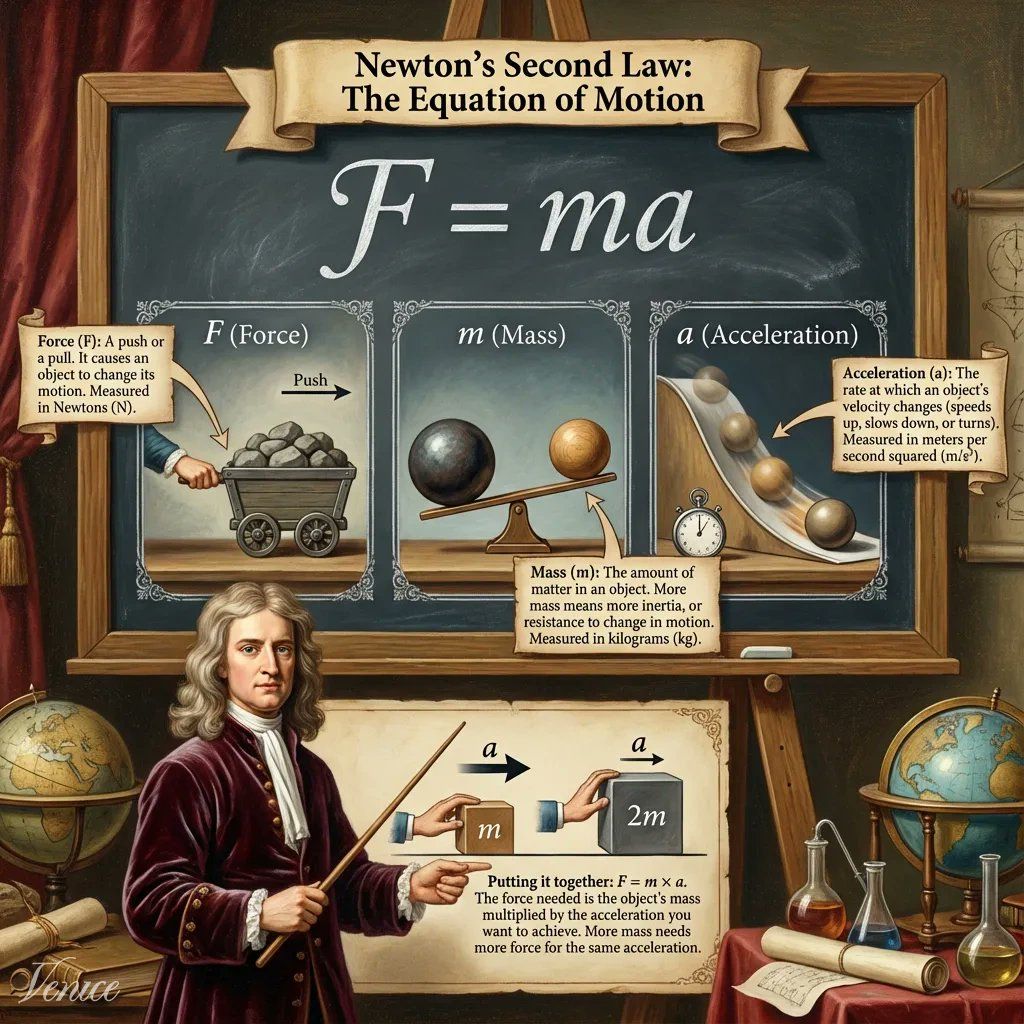
Seedream is also now available as a pay-per-use image model.
App
Released a new, simple model switcher and a new action menu to all users.
The model switcher now rearranges user tags and triggers settings/actions on hover.
The action menu fixes a bug with the Video button on img2video models.
Temporary chats are now live for all users, with the selection persisting across sessions and the state reflected in the chat input.
Added a progress circle to display context usage and a circular progress indicator with a tooltip for character count.
Added a confirmation dialog before video regeneration and consolidated confirmation button styling across the app.
Fixed an issue where the "Create Account" link in the video notice was broken.
Improved LaTeX rendering to allow more single-dollar-sign inline math correctly.
Prevented HTML and meta tags from being rendered in chat messages.
Treats HTML as plain text in user message markdown.
Fixed a bug with the Support Bot repeating its answer and another with its response rendering.
Fixed the Character Action Menu button to only open on the intended hover event.
Updated copy on the delete character confirmation and added validation for chat IDs passed through the URL.
Disabled the original NanoBanana (V1) model.
Fixed message/avatar alignment in multi-modal.
Added support for text parsing from native Word (DOCX) files.
Added support for XLSX document text parsing using markdown-tables.
Removed the "new" tag from the support bot.
Models
GLM 4.6 was set as the default for all users, then reverted due to high output token volume, and later reapplied.
Added a multi-modal flag to the Gemma model.
Qwen3-235b is retiring from the in-app model selection, replaced by new Qwen235b API model IDs.
Added private tags to LLM and image models for better filtering.
Added anonymized tags to text models.
Prompt Enhance model has been changed to GLM.
Wan 2.5 is now the default video model.
Added negative prompt support to the video settings modal for models that support it.
Kimi was hidden as reasoning is not supported.
Video
Set Wan 2.5 as the default video model.
Changed video model badges layout to prevent the model name from wrapping.
Added a dialog for credit confirmation before video regeneration.
API
Added support for reasoning_content instead of <thinking> tags for reasoning models.
Added mini app tags to the CMS at the request of Coinbase.
Fixes and Improvements
Fixed an issue with double charging for pay-per-use image models.
Fixed a missing icon for VEO Fast.
Fixed an artifact bug and added a watermark to Seedream images.
Fixed a table overflow-x issue.
Improved stop/cancel behavior for multi-modal requests.
Fixed an issue where deleting a folder/character would not delete the conversations within it.
Memoized the gauth client promise to avoid duplicate promises during await.
4 november 2025

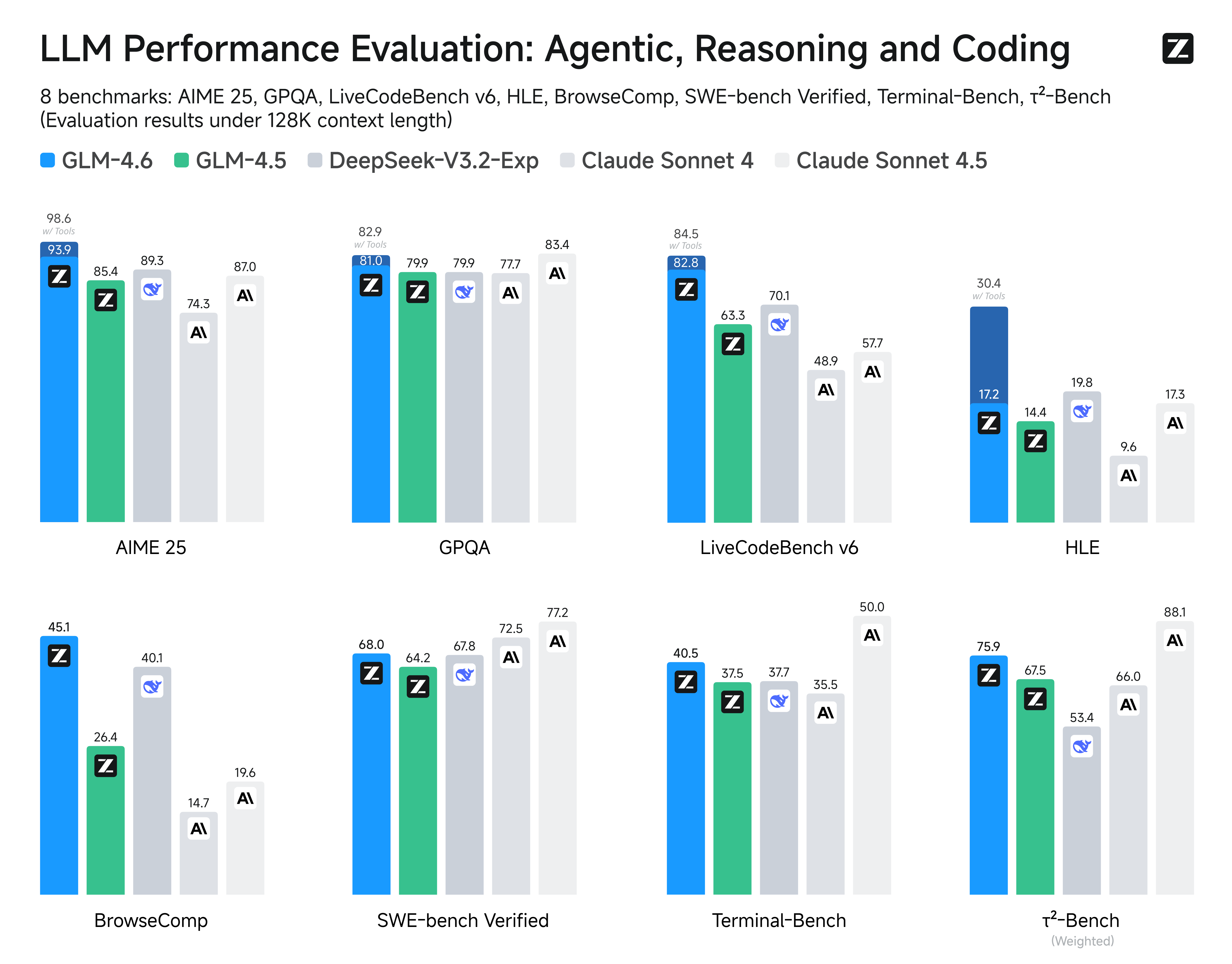
GLM 4.6 is now available for Pro users
Developed by Zhipu AI, this model benchmarks extremely high against both closed and open source models. It performs well in character chats and creative writing but mainly excels in tasks where you want a smarter model for analysis or structured problem solving.
Please note that GLM 4.6 is currently live without reasoning.
Web Scraping is Live in the app and API
You can now turn any URL into AI context on Venice Just include a URL in your prompt, and Venice will automatically scrape the page to include as context for your request
Full blog announcement: https://venice.ai/blog/web-scraping-live-on-venice-turn-any-url-into-ai-context
App
New Library: We are inviting all users to use the all-new Library, a redesigned space to manage and view your generated content.
Video regeneration: You can now change the model and video settings when re-generating videos, giving you more creative control.
HEIF Image Support: You can now upload and use HEIF images in the Image Editor and Upscaler.
Markdown Tables: Added support for GitHub-flavored markdown, including tables, for richer formatting in chat.
URL Detection: The URL detection feature is now enabled for all users, automatically identifying and processing links in your prompts.
Video & Image Variations Badge: Added a badge indicator on the chat submit button to show the count of video and image variations to be generated.
UI/UX Polish:
Updated the state label for the web search toggle button for clarity.
Fixed an Infura connection error message.
Tweaked character escaping to correctly display bold text in edited messages.
Fixed text message alignment and edit message padding.
Resolved a Support Bot submit button issue on certain screen sizes.
Fixed missing action buttons below the last generated video variations.
Video Preview: Added support for video in the photo preview on the chat interface.
Mini App: Implemented auto-connect functionality within the mini app on Base.
Mobile App: Updated the Android APK download URL to point to version 1.3.0.
ASR on Mobile: Automatic Speech Recognition (ASR) is now available for mobile beta users.
Models
Added GLM 4.6: GLM 4.6 is now available for Pro users.
Added Dolphin Mistral 3.2 (Beta): The new Dolphin Mistral 3.2 model is now available in beta.
Added Veo 3: By popular demand, we have brought back the Veo 3 video generation model.
Removed Wan 2.5 Safety Check: The safety check on the Wan 2.5 model has been removed for a more open generation experience.
Decommissioned Flux Models: We have decommissioned the older Flux generation models to streamline our offerings.
Features
Memoria (Beta): Memoria is now in beta, providing advanced memory retention for longer conversations and more coherent character interactions.
Character Share Links: Added a share link to the character menu, making it easy to share your custom characters with others.
Fixes & Improvements
PDF Uploads: Resolved an issue that was blocking multilingual PDFs from being processed correctly.
Image Upscaling: Improved image quality for upscaled outputs and forced PNG format to remove jpeg compression artifacts.
Rate Limit Messages: Fixed incorrect rate limit messages for anonymous and free users across chat, image, and video generation.
Credit Balances: User credit balances now update correctly after usage, DIEM stakes, and unstakes.
API
Search-Based Pricing: Enabled usage-based pricing for web search for all users.
20 oktober 2025
API
App
Models
Features
Characters

Thanks for your patience in-between release notes — the Venice team has been hard at work over the last month at our all-hands offsite preparing for Venice V2 and shipping our most requested feature to date, Venice Video.
Moving forward, release notes will move to a bi-weekly cadence.
Venice Video
Video generation is now live on Venice for all users.
You can create videos on Venice using both text-to-video and image-to-video generation. This release brings state-of-the-art video generation models to our platform including Sora 2 and Veo 3.1.
You can learn all about this offering here.
Venice Support Bot
Launched AI-powered Venice Support Bot for instant, 24/7 assistance directly in the UI.
Bot pulls real-time information from venice.ai/faqs to provide up-to-date answers to common questions.
Users can escalate to create support tickets with context when additional help is needed beyond FAQ responses.
Available in English, Spanish, and German.
Accessible via bottom-right corner (desktop) or chat history drawer (mobile browser/PWA).
App
Launched Image “Remix Mode” - This is like regenerate, but uses AI to modify the original prompt. This provides an avenue to explore image generation prompts in more depth.
Added “Spotlight Search” to the UI. Press Command+K on a Mac or Control+K on Windows to open the conversation search.
Add a toggle in the Preferences to control the behavior of the “Enter” key when editing a prompt.
Characters
Venice has launched a “context summarizer” feature which should improve the LLMs understanding of important events and context in longer character conversations.
API
Added 3 new models in “beta” for users to experiment with:
Hermes Llama 3.1 405b
Qwen 3 Next 80b
Qwen 3 Coder 480b
Retired “Legacy Diem” (previously known as VCU). All inference through the API is now billed either through staked tokenized Diem or USD.